
How to read an Anesto case report.
An anesthesiologist or CRNA sent you a PDF made in Anesto, an iPhone app for logging anesthesia cases. This page explains where to find the numbers, what they count, and what the report does not claim.
The short version
- It is the clinician’s own record. They log each case in the app, and the report is built from those cases.
- The app has not checked it against any hospital’s records. Anesto does not connect to any hospital system. The last page has an attestation for the clinician to sign. If those lines are blank, it is unsigned.
- It has no patient names, record numbers or birthdays. Anesto has no field for them. A case shows its date, the procedure and the patient’s age range.
- It leaves out training cases. Cases logged as a resident or fellow are not counted. If any were left out, a “Not included” line under the header says how many.
- It has no “made on” date. The dates on it are the period covered and the dates of the cases. The day it was made is in the file’s name.
What to find first
- The title. There are two reports, and the large title on page 1 says which one you have: “Privileges Case Summary” or “Anesthesia Case Log”. Go by the large title. The small line under it, in capitals, can read like the other one’s name, and the file’s name does not help: both arrive as “Anesto Credentialing Report” and a date.
- The line at the top right of page 1. On a Privileges Case Summary it gives the hospital, the dates covered and the total number of cases. Check the dates against the period your form asks about. A Privileges Case Summary covers exactly 12 or 24 months, and the first case in it can be later than the first date shown. If yours covers the wrong period, ask the clinician for another. On an Anesthesia Case Log the same line gives the dates, the total and the number of sites.
- A “Not included” line, if there is one under that. On a Privileges Case Summary it can say a case had no hospital recorded. That case is in no row of the report.
- The Practice capacity table. The total counts every case, however the clinician worked on it. For a physician, that includes cases directed or supervised as well as cases done alone. This table shows the split.
The hospital named on the report is the site the clinician logged those cases at. For a new applicant, that may not be your hospital.
Case counts and “Recorded on”
This table opens the Privileges Case Summary. The clinician picks which rows to print. Most rows have two numbers, and the one for your form is under Cases.
Recorded on is not a date, and it is not the count. Each row is counted from a field or two in the case record, and “Recorded on” says how many cases had anything there.
In the sample, Cardiac surgery shows 37 under Cases and “91 of 150” under Recorded on. The clinician logged 37 cardiac surgery cases. The field that row reads had an entry on 91 of the 150 cases. On the other 59 it was blank. Usually that is expected: the field is used only for certain kinds of surgery, so a knee scope or a cataract leaves it blank.
The report’s own footnote adds: “A blank field can mean none was used, or none was logged. A case can count in more than one row.”
What each row counts. Your report may show only some of these.
| Row | What it counts |
|---|---|
| All cases | Every case in the report |
| Children under 18, under 12, under 3, under 1; Infants under 3 months | Cases by the patient’s age range |
| Cardiac surgery | Cardiac surgery with or without bypass |
| Cardiac, on bypass | Cardiac cases on bypass only |
| Intracranial | Procedures inside the skull, open or endovascular |
| Major vascular | Open and endovascular cases on major vessels. Dialysis access is not counted. |
| Thoracic, one-lung | Cases with one-lung ventilation, a double-lumen tube or a bronchial blocker |
| Cesarean deliveries, Labor epidurals | A labor epidural that ends in a cesarean counts as a cesarean only |
| Spinals and epidurals | Any spinal, epidural or combined spinal-epidural (CSE). A CSE is in both sub-rows. |
| Nerve blocks | Peripheral nerve blocks, with one sub-row for each type logged |
| Video laryngoscopy (intubations), Fiberoptic intubation, Nasal intubation | Intubations where the clinician logged that technique |
| TEE, Arterial lines, Central lines, PA catheters | Cases where the clinician logged that monitor. In the case list a central line is “CVP”. The report does not say who placed a line or read the TEE. |
| Emergencies (ASA E) | Cases whose ASA class was logged with an E. Nothing else marks a case as an emergency. |
The summary tables
Both reports carry these. In a Privileges Case Summary they cover only the hospital and months in its header.
- Practice capacity. How the clinician worked on each case. A physician’s report shows “Solo” and “Directing & supervising”. The second adds medical direction and supervision into one number. A CRNA’s report shows “Independent”, “Medically Directed” and “Medically Supervised”. “Not recorded” means the clinician never answered for those cases.
- ASA physical status. The ASA class is a standard rating of the patient’s overall health. “% of total” is the share of all cases in the report. “% emergency” is the share of that class logged with an E. In the Anesthesia Case Log sample, 17.6% beside ASA 4 means 17.6% of the ASA 4 cases. A case with no ASA class is in no row, so the column can add up to less than 100%.
- Patient age. A case with no age is in no row, so the rows can add up to fewer than the total.
- Anesthesia type. The report says: “A case may use more than one technique, so type counts exceed the case total.” The table lists the eight most common. “PNB” is a peripheral nerve block, and “MAC” is monitored anesthesia care.
- Facilities. Each site with its setting (hospital, surgery center or office), its case count, and its first and last case dates. Cases logged with no site are on a “No site recorded” row. That row is not another facility.
- Specialty distribution, on the last page. This is the surgical service, not the anesthesia subspecialty.
The case list
“Case Detail” lists every case, grouped by site, newest first, with a subtotal for each site.
- Words in parentheses. A procedure can be followed by the clinician’s own words for it, like “Aortic Valve Replacement (AVR)”. That is one procedure, not two.
- An asterisk (*) marks a case that was performed but has a field missing. The line under it names the field: “Case performed; record incomplete — missing: age”.
- A dagger (†) marks a draft: a case the clinician has not confirmed yet. Drafts are still listed and counted.
- Smaller lines under a case give its nerve blocks (“Blocks:”), a difficult airway (“DA”) or life-threatening pathology (“LTP”).
- A line under the Facilities table gives the totals for both marks, or says “Every case in this report carries a complete record.”
The attestation and the chair line
The last page ends with a statement and lines for a signature, printed name and date. The app leaves them blank for the clinician to sign. In the Privileges Case Summary the statement names the hospital and the dates. The sample reads:
“I attest that the counts above are an accurate record of anesthesia care I personally provided at Stillwater University Hospital from November 29, 2024 to November 28, 2026, as logged in Anesto. Counts reflect what was recorded for each case.”
When the report covers all of the clinician’s hospitals, it says “the hospitals named in this report” in place of one name. In the Anesthesia Case Log the statement reads:
“I attest that the information contained in this report is an accurate record of anesthesia cases performed during the stated reporting period. This report was generated from case data logged in the Anesto application by the named physician.”
A CRNA’s report says “CRNA” where a physician’s says “physician”.
If the clinician added it, a block titled “Department chair verification” follows. It is a title and the same three lines. It carries no statement of its own, so the report does not say what a chair checked. What that signature means is for the chair and your office to settle.
The two reports, side by side
| Privileges Case Summary | Anesthesia Case Log | |
|---|---|---|
| Small line under the title | “Anesthesia Case Log” | “Credentialing Summary” |
| What it covers | One hospital, or all of the clinician’s sites together. The header then says “All hospitals” | Every case logged after training, at every site, unless the clinician narrowed it. A report narrowed by more than dates has a line that starts “Filtered:” |
| The dates in the header | Exactly 12 or 24 months, ending on a day the clinician picked | The first and the last case in the report, or a date range the clinician picked |
| Case counts by category | Yes, at the start | No |
| The list of every case | Unless the clinician left it out | Always |
| Signature lines | The clinician, and a department chair if the clinician added that line | The clinician |
Samples to compare yours with:
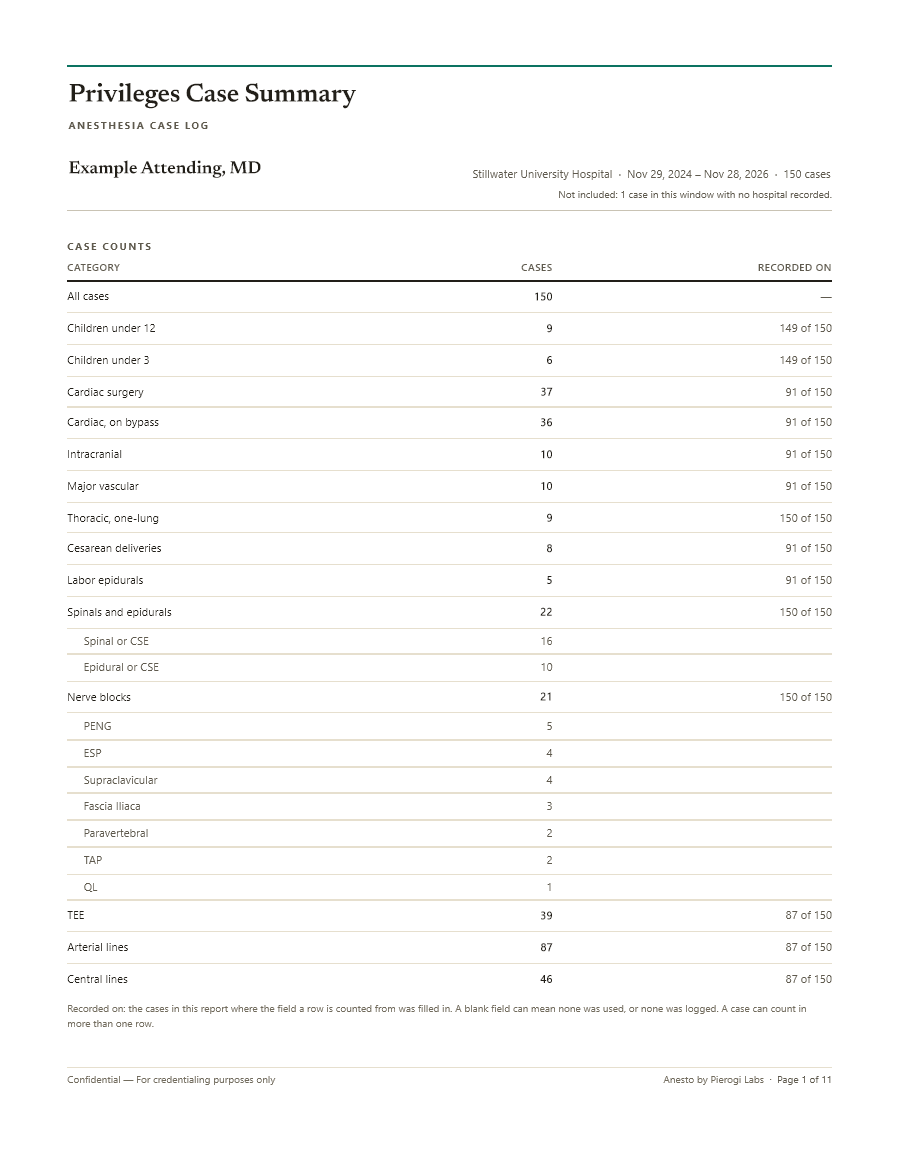 Sample: Privileges Case SummaryPDF · 11 pages · invented data
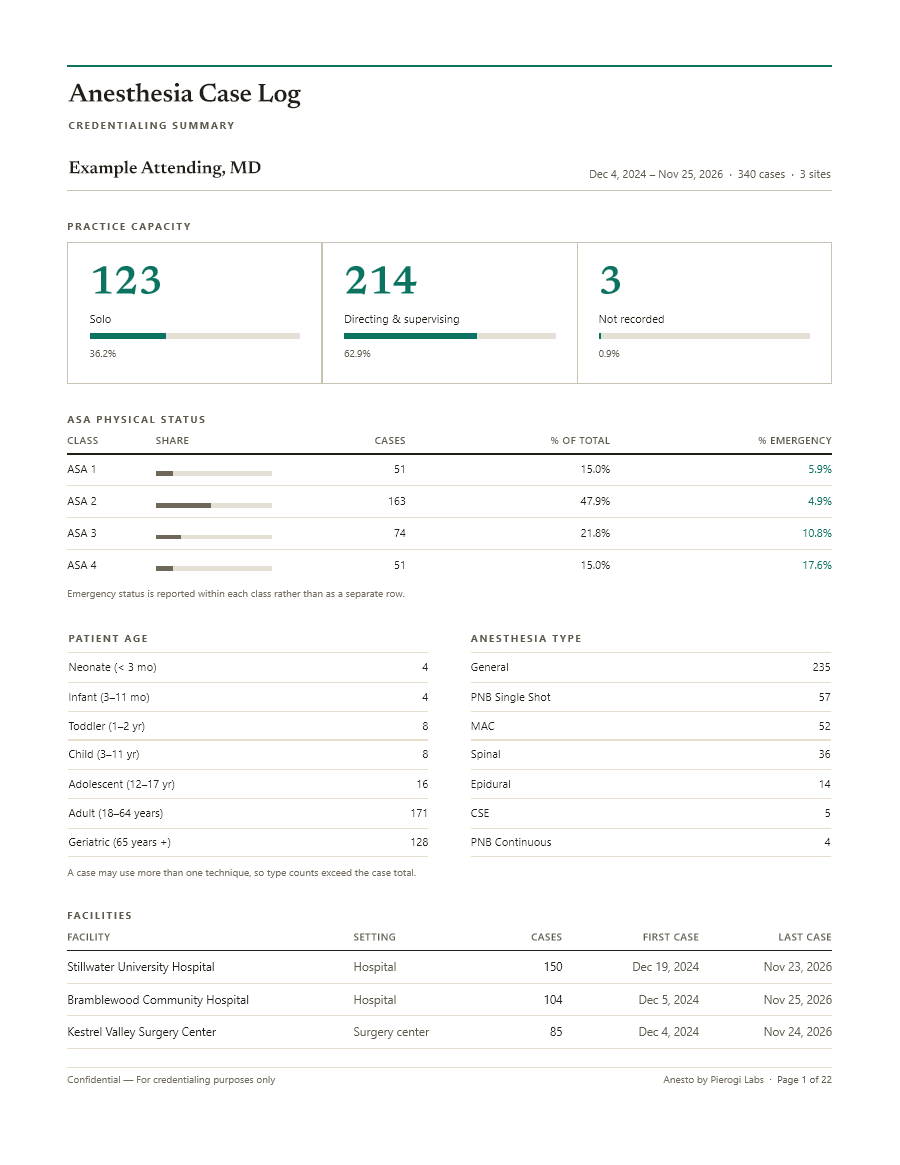 Sample: Anesthesia Case LogPDF · 22 pages · invented data
Every person, hospital and case in the samples is invented. The samples were made with the app’s own report builder, run on a computer. A page can break in a slightly different place than on a phone. Sample of a CRNA’s Anesthesia Case Log (PDF, 22 pages).
What the report does not claim
- It is not a hospital record. Treat it the way you would any log a clinician keeps. If the cases were done at your hospital, you can compare it with your own records.
- It is not signed or certified by Anesto. The only signatures are the ones people add. The name at the top, and the letters after it such as MD or CRNA, print exactly as the clinician typed them.
- It does not say the clinician meets your requirements. It gives counts. Your form and your committee decide.
If you’re the clinician
Send the link to this page with your PDF.
Checked November 28, 2026. Every statement about the reports was checked against the App Store version of Anesto and the sample PDFs above.
Each hospital sets its own requirements and decides what it accepts. Nothing on this page says that any hospital, board or accrediting body accepts or endorses these reports. Anesto is made by Pierogi Labs LLC. The footer of each report page says “Anesto by Pierogi Labs”.